
PSD Citywide

Share on

Key Takeaways:

  • Who: Public Works and fleet teams struggling with paper-based processes and limited resources
  • What: Digital work order management that replaces manual paperwork with mobile, centralized systems
  • Benefit: Increased productivity, stronger compliance, real-time visibility, and smoother adoption through small pilots and familiar workflows, freeing technicians to focus on maintenance instead of admin work


Your technicians’ expertise is too valuable to spend on paperwork. 

Across North America, Public Works and fleet departments are still buried in paper work orders, binders, and spreadsheets, even as budgets shrink, crews stay small, and service demands grow. The cost isn’t just frustration—it’s productivity lost every single day.

Digital work order management is a system that allows Public Works and fleet teams to complete maintenance tasks electronically instead of on paper. By using mobile devices and centralized software, this approach significantly reduces the amount of time spent on tasks.

Municipal teams across North America are using Citywide Maintenance, a Computerized Maintenance Management System (CMMS), to move away from paper, centralize work orders, and give technicians mobile tools that match how they actually work. This digital work order management software helps automate work orders, track preventive maintenance, and keep field and office staff aligned in real time. Explore Citywide Maintenance

Read on to learn why manual paperwork still dominates, and how to break free without disrupting daily operations.


Why are Public Works Technicians Still Stuck on Paperwork?

Public Works technicians are still stuck on paperwork because legacy processes, disconnected systems, and compliance pressures make using paper feel safer and easier than changing workflows.

  • Legacy Processes That “Still Work”

Most Public Works teams have used the same carbon-copy forms, clipboards, and logbooks for decades. The process is familiar, so it rarely gets questioned.

Even when staff know it’s inefficient, they often feel that changing paper-based workflows will be more painful than sticking with what they know. For many supervisors, forms are still the default.

  • Disjointed Systems and Duplicate Entry

In a typical municipal environment, work orders, asset inventory and parts data often live in separate spreadsheets or systems. Staff fill out a paper work order, an office clerk adds it into a spreadsheet, and another staff member might re-enter the same data into a finance or asset system.

This disconnected setup creates duplicate entries, inconsistent records, and service delays. It also makes it nearly impossible to see, in one place, which work has been completed, what assets are at risk, and where you can improve maintenance crew productivity.

The unified Citywide Platform lets you capture work once and share it automatically with asset management, finance, and Public Works leadership, eliminating duplicate entry and inconsistent records.

  • Compliance and Audit Pressures

Compliance requirements and inspection audits place real pressure on Public Works and fleet operations. For many managers, physical signatures and paper binders feel safer and more “provable” during audits.

However, those same paper trails come with hidden costs: missing forms, illegible handwriting, and incomplete fields. When there’s an inspection, staff may need to scramble to track down documents that may or may not be complete.

With Citywide Maintenance, every inspection, work order, and service request is stored digitally with timestamps and work histories, so you can quickly demonstrate compliance when it matters most.   

  • Change Fatigue and Technology Skepticism

Many crews have lived through at least one software project that did not stick. Maybe the system was too complex, lacked mobile access, or never integrated properly with other municipal tools.

After a few failed experiences, it’s no surprise that field staff, especially seasoned technicians nearing retirement, trust their clipboards more than their screens. To earn their buy-in, any new digital work order management solution must feel reliable, simple, and tailored to how they already work.


The Operational Cost of Staying on Paper

Paper may feel inexpensive, but the operational costs are significant and ongoing.

  • Lost Labour Hours

Ten extra minutes of paperwork per work order sounds small. Multiply that by dozens of work orders per day and hundreds per month. Those minutes turn into days or even weeks of lost productive time each year – time your best technicians could spend on preventive maintenance, clearing backlogs, or tackling higher-risk assets, not filling out forms at the end of a shift.

Local governments that move from paper to a digital work order management system often see those extra minutes converted into completed preventive maintenance and more value-added work.

  • Audit and Compliance Risk

Paper records are easy to misplace, damage, or overlook. If a critical inspection sheet goes missing, you may have no clear proof that work was completed properly or on time.

Inconsistent documentation increases risk during regulatory reviews, safety investigations, or insurance claims. The more you rely on manual logs, the harder it is to prove compliance when it matters.

  • Knowledge Erosion as Staff Retire

In many municipalities, institutional knowledge lives in the heads of senior technicians and their personal notebooks. When those staff members retire or change roles, their expertise leaves with them. Without centralized digital histories, it’s difficult for new hires to understand asset condition trends, recurring failures, and the most effective fixes.

Digital work order histories like those provided in Citywide Maintenance and Citywide Assets preserve this institutional knowledge so new staff can quickly see what has been done, what worked, and what assets to watch out for.

  • Morale and Engagement Decline

Your best technicians did not enter the trade to become administrators. When their day is dominated by paperwork and manual reporting, pride in their craft can suffer.

Over time, this saps motivation and makes it harder to retain skilled people in a competitive labour market. Reducing paperwork isn’t just about efficiency; it’s about valuing their time and expertise.


How Does Digital Work Order Management Improve Municipal Maintenance Crew Productivity?

Digital work order management frees technicians from paperwork by replacing manual forms with electronic work orders that capture data once and share it across the organization.

A well-designed digital work order management system—like Citywide Maintenance—removes friction instead of adding it. It puts mobile work orders and asset histories in your crews’ hands so they spend less time chasing paper and more time completing repairs.

  • Mobile Simplicity for Crews

With mobile work orders, staff can:

  • Open, accept, and complete work orders on smartphones or tablets
  • View asset history and standard procedures in the field
  • Close out jobs as soon as work is done, without needing to return to the office

This mobile-first approach translates directly into higher maintenance crew productivity and faster response times.

The Citywide Mobile App extends your maintenance and asset management tools into the field, so technicians can accept and complete work orders, update asset data, and capture inspections right from their smartphones or tablets.

  • Photo Capture Instead of Paragraphs

Digital work orders let staff capture time-stamped photos and brief notes instead of writing long descriptions. An image of a cracked culvert, failed pump, or corroded fitting communicates the issue faster and more clearly than paragraphs ever could. These visuals give supervisors, engineers, and auditors who weren’t on-site immediate context, while creating a reliable audit trail that strengthens documentation, accountability, and recordkeeping.

  • Offline Capability for Remote Work

Public works crews often operate in areas with poor or no connectivity. A strong digital work order management platform lets staff work offline and automatically syncs data when they return to coverage. This ensures no work is lost and keeps your teams productive whether they’re in a treatment plant, rural road, or remote lift station.

  • Integration with GIS and Finance Systems

Disconnected systems are one of the main reasons municipalities stay on paper. Modern maintenance platforms integrate with:

  • GIS and GIS viewers, so work orders are tied to precise asset locations
  • Finance and ERP systems, so labour hours, equipment usage and materials flow directly into cost tracking
  • Asset management and capital planning, so field data informs long-term decisions

This level of integration eliminates multiple data entry and gives leadership clear visibility into work, costs, and asset conditions.

The Citywide Platform integrates maintenance with GIS, budgeting, and asset management, giving you a single source of truth for work, costs, and asset condition across roads, water, fleet, facilities, and more.

  • Real-Time Visibility for Management

Digital work orders provide dashboards and reports that show:

  • Which work orders are complete, which are outstanding, and how many are overdue
  • What crews are working on today, what they completed yesterday, and time each work order took to complete
  • Trends in failure types, response times, and backlog

With real-time visibility, supervisors no longer need to chase paper or wait for end-of-week summaries to understand performance.

Metric Manual Paperwork Citywide Digital Workflows
Data Accuracy Prone to errors, illegible handwriting, and duplicate entry Standardized fields, validation, and single-entry data capture
Time on Entry Technicians spend significant time filling out and re-entering forms Fast, in-field entry with mobile devices and automated workflows
Audit Readiness Records are scattered, incomplete, and time-consuming to verify Time-stamped, centralized records that are always audit-ready
Data Accessibility Limited access, often stored in binders or local files Real-time access across teams, departments, and locations
Reporting Speed Manual compilation delays insights and decision-making Instant dashboards and reports for real-time visibility
Compliance Tracking Inconsistent documentation and difficult verification Built-in tracking with complete histories and audit trails
Workflow Efficiency Fragmented processes and repeated data handling Streamlined workflows with integrated systems and automation
Long-Term Value Ongoing labour costs and lost productivity Improved efficiency, better data, and stronger asset planning


Citywide Maintenance provides configurable dashboards and reports so supervisors can see assignments, status, and trends at a glance whenever they need to.
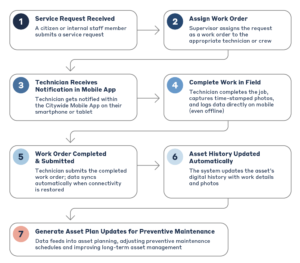
Digital Work Order Process Flow

Digital work order management workflow showing service request intake, work order assignment, mobile technician updates, field completion with photos, automatic asset history updates, and preventive maintenance planning


How Can Municipalities Move from Paper to Digital Work Orders Without Disruption?

Municipalities can move from paper to digital work orders without disruption by starting with a small pilot project, mirroring existing paper processes in the new system, and providing hands-on training and support for crews.

Adopting digital work order management doesn’t need to be a massive, risky project. The key is to start small, respect your existing processes, and support your people.

  • Start with a Focused Pilot Project

Begin with:

  • One department or facility
  • A small group of willing technicians and supervisors
  • A defined set of high-volume work types (e.g., service requests, inspections, reactive repairs)

Use this pilot to gather feedback, fine-tune workflows, and build internal champions before expanding.

  • Respect Experience and Existing Habits

Instead of forcing staff to change everything at once, configure the system to reflect your best existing paper forms and processes. Keep fields familiar and avoid overloading screens with unnecessary options.

When crews see that the digital process feels like their clipboard, just faster, they are more likely to adopt it.

  • Emphasize Reliability and Support

To build trust, clearly communicate:

  • System uptime and performance expectations
  • How data will be migrated and backed up securely
  • How digital records will support audits and compliance
  • How the system will make completing tasks easier for the whole team

Pair this with responsive support, so field staff know they will not be left troubleshooting alone at 6 a.m.

  • Train Thoroughly and Continuously

Hands-on training is essential, especially for senior staff. Focus on:

  • Short, task-based sessions (e.g., “How to close out a work order” rather than generic lectures)
  • Peer mentors: staff and operators who adopt early and can coach coworkers
  • Refresher training as you roll out new features or to new teams

The message should be clear: the goal is to empower staff, not replace them

PSD Citywide’s implementation and advisory teams work alongside your staff to configure workflows that mirror your best existing paper processes and deliver quick wins. Learn how our digital work order management software supports step-by-step rollouts for Public Works and fleet teams.


The Payoff: More Repairs, Less Paperwork

When digital work order management is implemented thoughtfully, the benefits are visible in the office, the field, and at council. Technicians spend more time on repairs and maintenance instead of pens, supervisors manage by dashboards instead of piles of forms, and safety and audit documentation becomes easier to access and defend.

With Citywide Maintenance, every work order, inspection, and service request becomes structured data that supports compliance, budgeting, and planning—not just another piece of paper in a binder.


Best Practices for Public Works Leaders

If you’re ready to reduce paperwork and boost maintenance crew productivity, here are some practical steps:

  • Digitize High-Frequency Tasks First: Start with inspections, service requests, and standard repair work. These tasks generate the most paperwork and offer the fastest wins.
  • Standardize Mobile Forms: Design simple, standardized templates so crews capture consistent data in the field. Use required fields sparingly but strategically for important information.
  • Encourage Photo Documentation: Build photo capture directly into your digital forms. Replace long text fields with image uploads and short, structured comments.
  • Phase Out Paper Strategically: Don’t try to eliminate paper overnight. Review remaining paper logs quarterly, identify why they persist, and convert them into digital logs step by step.
  • Share Results with Leadership and Council: Track metrics such as closed work orders per week, average response time, and data completeness before and after going digital. Present tangible improvements to finance and council to demonstrate ROI and justify further investment.

These practices are easier when you have a municipal-focused maintenance and asset management platform designed specifically for Public Works and fleet operations.


Free Your People to Do Their Best Work

When your most skilled people spend less time completing forms, they deliver more reliable service, safer operations, and stronger asset performance. Paper-based processes may feel familiar, but they quietly erode maintenance crew productivity, institutional knowledge, and morale.

A modern, municipal digital work order management system respects existing expertise while preparing your organization for the future. By starting small, supporting your staff, and focusing on high-impact tasks, you can move from paper-heavy to insight-driven operations – freeing your technicians to do what they do best.


Book a Citywide Maintenance Demo

See how Citywide software supports public works and fleet teams

More Articles

Become a Partner