Key Takeaways:
Citywide Maintenance provides configurable dashboards and reports so supervisors can see assignments, status, and trends at a glance whenever they need to.
- Who: Public Works and fleet teams struggling with paper-based processes and limited resources
- What: Digital work order management that replaces manual paperwork with mobile, centralized systems
- Benefit: Increased productivity, stronger compliance, real-time visibility, and smoother adoption through small pilots and familiar workflows, freeing technicians to focus on maintenance instead of admin work
Why are Public Works Technicians Still Stuck on Paperwork?
Public Works technicians are still stuck on paperwork because legacy processes, disconnected systems, and compliance pressures make using paper feel safer and easier than changing workflows.-
Legacy Processes That “Still Work”
-
Disjointed Systems and Duplicate Entry
-
Compliance and Audit Pressures
-
Change Fatigue and Technology Skepticism
The Operational Cost of Staying on Paper
Paper may feel inexpensive, but the operational costs are significant and ongoing.-
Lost Labour Hours
-
Audit and Compliance Risk
-
Knowledge Erosion as Staff Retire
-
Morale and Engagement Decline
How Does Digital Work Order Management Improve Municipal Maintenance Crew Productivity?
Digital work order management frees technicians from paperwork by replacing manual forms with electronic work orders that capture data once and share it across the organization. A well-designed digital work order management system—like Citywide Maintenance—removes friction instead of adding it. It puts mobile work orders and asset histories in your crews’ hands so they spend less time chasing paper and more time completing repairs.-
Mobile Simplicity for Crews
- Open, accept, and complete work orders on smartphones or tablets
- View asset history and standard procedures in the field
- Close out jobs as soon as work is done, without needing to return to the office
-
Photo Capture Instead of Paragraphs
-
Offline Capability for Remote Work
-
Integration with GIS and Finance Systems
- GIS and GIS viewers, so work orders are tied to precise asset locations
- Finance and ERP systems, so labour hours, equipment usage and materials flow directly into cost tracking
- Asset management and capital planning, so field data informs long-term decisions
-
Real-Time Visibility for Management
- Which work orders are complete, which are outstanding, and how many are overdue
- What crews are working on today, what they completed yesterday, and time each work order took to complete
- Trends in failure types, response times, and backlog
| Metric | Manual Paperwork | Citywide Digital Workflows |
| Data Accuracy | Prone to errors, illegible handwriting, and duplicate entry | Standardized fields, validation, and single-entry data capture |
| Time on Entry | Technicians spend significant time filling out and re-entering forms | Fast, in-field entry with mobile devices and automated workflows |
| Audit Readiness | Records are scattered, incomplete, and time-consuming to verify | Time-stamped, centralized records that are always audit-ready |
| Data Accessibility | Limited access, often stored in binders or local files | Real-time access across teams, departments, and locations |
| Reporting Speed | Manual compilation delays insights and decision-making | Instant dashboards and reports for real-time visibility |
| Compliance Tracking | Inconsistent documentation and difficult verification | Built-in tracking with complete histories and audit trails |
| Workflow Efficiency | Fragmented processes and repeated data handling | Streamlined workflows with integrated systems and automation |
| Long-Term Value | Ongoing labour costs and lost productivity | Improved efficiency, better data, and stronger asset planning |
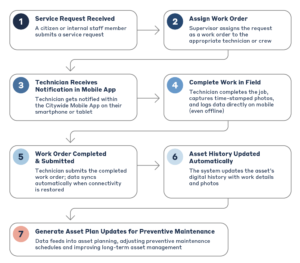
Digital Work Order Process Flow
How Can Municipalities Move from Paper to Digital Work Orders Without Disruption?
Municipalities can move from paper to digital work orders without disruption by starting with a small pilot project, mirroring existing paper processes in the new system, and providing hands-on training and support for crews. Adopting digital work order management doesn’t need to be a massive, risky project. The key is to start small, respect your existing processes, and support your people.-
Start with a Focused Pilot Project
- One department or facility
- A small group of willing technicians and supervisors
- A defined set of high-volume work types (e.g., service requests, inspections, reactive repairs)
-
Respect Experience and Existing Habits
-
Emphasize Reliability and Support
- System uptime and performance expectations
- How data will be migrated and backed up securely
- How digital records will support audits and compliance
- How the system will make completing tasks easier for the whole team
-
Train Thoroughly and Continuously
- Short, task-based sessions (e.g., “How to close out a work order” rather than generic lectures)
- Peer mentors: staff and operators who adopt early and can coach coworkers
- Refresher training as you roll out new features or to new teams
The Payoff: More Repairs, Less Paperwork
When digital work order management is implemented thoughtfully, the benefits are visible in the office, the field, and at council. Technicians spend more time on repairs and maintenance instead of pens, supervisors manage by dashboards instead of piles of forms, and safety and audit documentation becomes easier to access and defend. With Citywide Maintenance, every work order, inspection, and service request becomes structured data that supports compliance, budgeting, and planning—not just another piece of paper in a binder.Best Practices for Public Works Leaders
If you’re ready to reduce paperwork and boost maintenance crew productivity, here are some practical steps:- Digitize High-Frequency Tasks First: Start with inspections, service requests, and standard repair work. These tasks generate the most paperwork and offer the fastest wins.
- Standardize Mobile Forms: Design simple, standardized templates so crews capture consistent data in the field. Use required fields sparingly but strategically for important information.
- Encourage Photo Documentation: Build photo capture directly into your digital forms. Replace long text fields with image uploads and short, structured comments.
- Phase Out Paper Strategically: Don’t try to eliminate paper overnight. Review remaining paper logs quarterly, identify why they persist, and convert them into digital logs step by step.
- Share Results with Leadership and Council: Track metrics such as closed work orders per week, average response time, and data completeness before and after going digital. Present tangible improvements to finance and council to demonstrate ROI and justify further investment.
Free Your People to Do Their Best Work
When your most skilled people spend less time completing forms, they deliver more reliable service, safer operations, and stronger asset performance. Paper-based processes may feel familiar, but they quietly erode maintenance crew productivity, institutional knowledge, and morale. A modern, municipal digital work order management system respects existing expertise while preparing your organization for the future. By starting small, supporting your staff, and focusing on high-impact tasks, you can move from paper-heavy to insight-driven operations – freeing your technicians to do what they do best. Book a Citywide Maintenance Demo See how Citywide software supports public works and fleet teams